Posted on

NSAR Database: How Landlords Verify ESA Registration (2025 Guide)

NSAR Database Emotional Support Animal Registration

Introduction

If you’ve ever submitted your Emotional Support Animal (ESA) paperwork to a landlord, you already know how unpredictable their reactions can be.

Some landlords know exactly what an ESA is… and others?

They’re not quite sure what’s legal, what’s not, what counts as proof, or how to verify anything.

This confusion leads to delays, disputes, unnecessary tension, and — in the worst cases — outright discrimination against tenants who rely on ESAs to manage real mental and emotional disabilities.

That’s exactly why the National Service Animal Registry (NSAR) created a secure, easy-to-use verification database:
a system that allows landlords and housing providers to confirm that:

  • an ESA or Psychiatric Service Dog (PSD) is legitimately registered,
  • the animal’s information matches what the tenant has provided, and
  • the documentation is not fraudulent or fabricated.

This guide breaks down how landlords actually verify NSAR registrations, what they can and cannot ask for, and how accurate verification protects both tenants and property owners.


🔗 Jump to a Section


📌 What the NSAR Database Is (and Isn’t)

There is a tremendous amount of confusion around online ESA registries — for good reason. Some sites provide nothing more than a certificate that looks official but means absolutely nothing.

So let’s be very clear:

✔ NSAR’s registry is a verification tool, not a legal requirement

The Fair Housing Act does not require any ESA to be in a database.
However, landlords commonly check:

  • registration IDs
  • documentation authenticity
  • whether an ESA appears legitimate

A secure verification tool helps reduce misunderstandings and fraud.

✔ NSAR’s registry is used as a confirmation system

Landlords can confirm:

  • the ESA or PSD’s name
  • the handler’s name
  • the registration ID
  • that the animal is part of a recognized documentation system

❌ It is NOT a government registry

No government ESA database exists. Any site claiming this is misleading tenants.

❌ It is NOT a replacement for a valid ESA housing letter

Per federal law, landlords may require:
✔ a legitimate ESA letter from a licensed mental health professional
❌ not ID cards
❌ not vests
❌ not certification documents

But these items help landlords verify legitimacy and reduce challenges, especially in cases of suspected fraud.


🧩 How Landlords Use NSAR to Verify ESA Registration

The NSAR database is intentionally simple so landlords don’t become overwhelmed.

Here’s exactly how the process works:

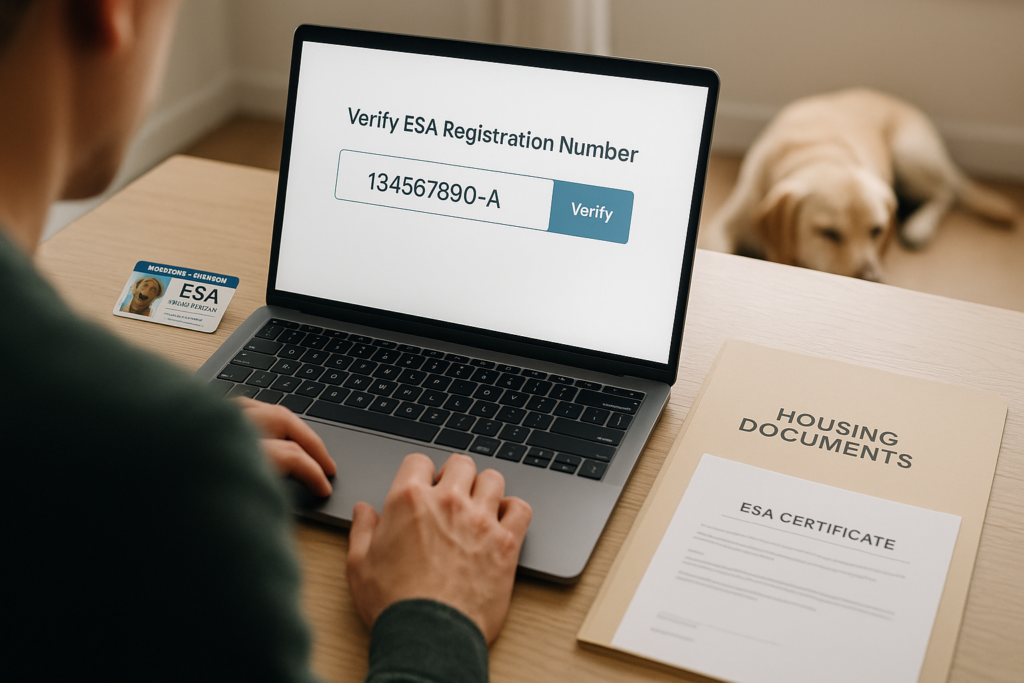
1. Tenant provides their NSAR registration number

This comes from their ESA or PSD certificate or ID card.

2. Landlord enters the registration number on the NSAR verification page

They type in the handler’s last name and the animal’s name OR the NSAR ID number and click search database.

3. The system displays a match confirmation

If the ID is valid, landlords see:

  • the handler’s name
  • the animal’s name
  • the type of assistance animal (ESA or PSD)
  • the registration’s active status

4. Landlord uses this information to confirm authenticity

This gives landlords reassurance that the documentation isn’t fabricated or altered.

5. Landlord may still request a valid ESA letter

Registration verification does not replace the need for a housing letter written by a licensed mental health professional (LMHP).


🔍 What Information Landlords Can See

To protect the privacy of tenants, landlords only see basic verification data, such as:

  • Animal’s name
  • Handler’s name
  • Registration type (ESA or PSD)
  • Registration ID
  • Valid/Active status

This ensures the landlord can confirm the ESA is legitimate without violating disability privacy laws.


🔐 What Information Stays Private

Landlords cannot view:

  • Your diagnosis
  • Your treatment history
  • Your specific disability
  • Personal medical information
  • Your mental health evaluation
  • Provider’s clinical notes

This is crucial because the Fair Housing Act (FHA) protects tenants from being forced to reveal sensitive medical information.

NSAR’s verification system respects those boundaries.


🛡 How NSAR Verification Helps Prevent ESA Fraud

Unfortunately, ESA fraud is widespread — usually from people using cheap “instant certificate” websites or fake ID cards purchased online.

Landlords have become much more alert to this, and many are now actively screening for fraudulent documentation.

NSAR helps prevent fraud by:

✔ Assigning unique, trackable registration numbers

Fake certificates can’t replicate the verification system.

✔ Requiring real handler/animal data

Not just generic certificate templates.

✔ Allowing landlords to instantly authenticate documentation

This reduces disputes and protects legitimate ESA owners.

✔ Supporting accurate identification for housing providers

Many landlords feel more comfortable approving an ESA when they can confirm everything matches.

🧠 Common Landlord Misconceptions About ESA Documentation

❌ “There’s a national ESA registry that’s required by law.”

No such thing exists.

❌ “I can deny an ESA if they aren’t registered.”

Incorrect. Registration is optional but helpful; the ESA letter is the legal requirement.

❌ “I can request details about the tenant’s medical condition.”

Absolutely not — this violates federal housing law.

❌ “I can charge a pet fee because it’s technically still an animal.”

Wrong. ESAs are not pets under federal law.

❌ “An ESA must be professionally trained.”

False. ESAs require no special training, unlike PSDs.

Educating landlords is half the battle, and NSAR’s verification system helps streamline the process.


🏠 Why Registration Helps Tenants Avoid Housing Conflicts

✔ It removes doubt

Landlords often deny ESAs simply because they don’t trust the documentation.

✔ It prevents accusations of fraud

Landlords are increasingly cautious due to fake ESA websites.

✔ It shortens approval time

Landlords get clear confirmation upfront.

✔ It shows professionalism

Tenants who provide organized, verifiable documents are taken more seriously.

✔ It reduces the likelihood of illegal denial

When landlords see legitimate verification, they’re less likely to challenge the request.


⚖️ What Landlords Cannot Ask For Under the FHA

Under the Fair Housing Act, landlords cannot ask for:

❌ Your diagnosis
❌ Details about your disability
❌ Your medical records
❌ A doctor’s note explaining your symptoms
❌ Your treatment plan
❌ A demonstration of your ESA’s abilities
❌ A request for additional or unnecessary paperwork

They may ask only for:

✔ A valid ESA housing letter from an LMHP
✔ Confirmation that the disability is legitimate
✔ Verification that the ESA is connected to the disability

That’s it.


🐾 How NSAR Supports ESA & PSD Owners

NSAR makes it easier for tenants by providing:

✔ ESA letters from licensed mental health professionals

Fully compliant with HUD housing guidelines.

✔ PSD letters for individuals with task-trained psychiatric service dogs

✔ Secure registration & verification

Avoids confusion and disputes during housing requests.

✔ Physical IDs, certificates, and vests

Not required by law — but extremely helpful for legitimacy.

✔ Easy landlord communication

Many landlords feel relieved knowing the ESA is documented in a legitimate system.


🧩 The Bottom Line

Landlords aren’t trying to be difficult — they’re often just confused about ESA laws and unsure how to verify documents.
The NSAR database solves that problem by providing simple, legitimate verification without exposing sensitive medical information.

For tenants, it means:
✔ smoother housing approvals
✔ fewer disputes
✔ less stress
✔ more credibility
✔ clear documentation

And for landlords, it means:
✔ peace of mind
✔ reduced fraud
✔ compliance with the FHA

When both sides have clarity, everyone wins — especially those who rely on Emotional Support Animals to maintain their mental well-being.

If you need a legitimate ESA letter or want to get your animal registered for easier verification, NSAR can help you every step of the way.
Posted on

How to Register Your ESA with NSAR

How to Register Your ESA with NSAR

If your Emotional Support Animal (ESA) helps you manage stress, anxiety, or other mental health challenges, you already know how important they are in your daily life. But when it comes to housing, campus living, or other formal situations, simply saying “this is my ESA” isn’t always enough.

That’s where the National Service Animal Registry (NSAR) can help. Registration gives you official ID cards, certificates, and a searchable database listing that makes it easier to prove your ESA’s legitimacy and avoid stressful disputes.

In this step-by-step guide, you’ll learn:

By the end, you’ll know exactly how to register your ESA with NSAR and how to use that registration to make housing and everyday life much smoother.


At-a-Glance: ESA Letter vs Registration

  • ESA Letter (Required for housing rights): Issued by a licensed mental health professional; used to request a reasonable accommodation (e.g., waive no-pet rules, no pet fees).
  • NSAR Registration (Optional but helpful): Provides ID cards, certificate, gear (vest/patches), and a database listing you can point to for quick verification. It doesn’t replace the ESA letter—it complements it.

Why Registering Your ESA Helps (Even Though It’s Optional)

Credibility and confidence. Registration gives you professional-looking ID cards and documents that reduce back-and-forth with landlords or housing staff.

Faster verification. A searchable database listing lets third parties confirm basic details quickly, which shortens conversations and lowers friction.

Clarity in public spaces. While ESAs don’t have public access rights like service dogs, a vest/patch can help avoid misunderstandings during travel logistics, lobby check-ins, or property tours.

Organization. You’ll have one clean package—digital copies, physical IDs, and a certificate—ready whenever you need it.


What’s Typically Included in NSAR Registration

Exact bundles may vary, but most owners choose between a Essential, Deluxe, and Premium style package:

Basic Package

  • ? Photo ID card (wallet-sized)
  • ? Certificate of registration
  • ?️ Database listing (searchable record)
  • ? Digital copies of your docs for email/print

Deluxe Package

  • Everything in Basic plus:
  • ? Vest (with ESA patch) for clarity in day-to-day situations
  • ?️ Patches/Tags for leash/collar or harness
  • ? Information Cards with ESA laws (varies by kit)

Premium Package

  • Everything in the Deluxe plus:
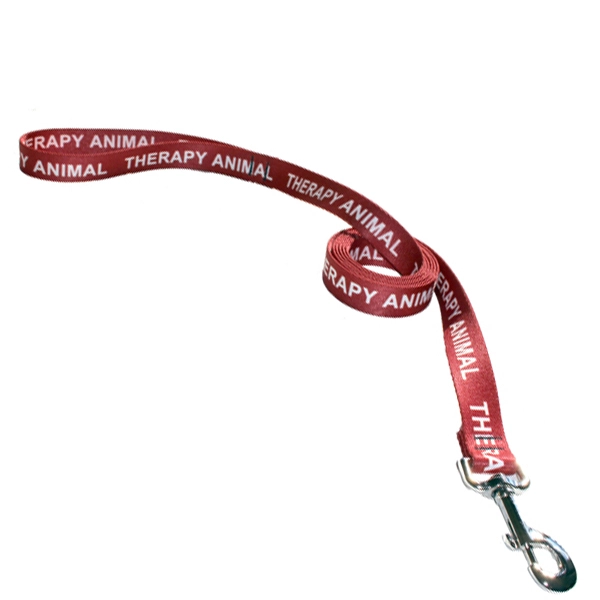
  • Leash
  • Collar
  • Personalized ID tag
  • Additional Information Cards
  • Extra ID card

Tip: If your primary goal is housing, Basic may be plenty. If you expect frequent verification moments (e.g., campus housing desks, building security), Deluxe adds visible clarity.


Step-by-Step: How to Register Your ESA with NSAR

1) Choose Your Package

Decide between Basic (documents + listing), Deluxe (documents + listing + gear), or Premium (documents + listing + lots of additional gear). If you’re unsure, list your typical scenarios (new lease, renewing, dorm move-in, frequent building check-ins) and choose accordingly.

2) Gather Your ESA Details

Have this ready:

  • Animal’s name, species, and breed (if applicable)
  • Clear photo (eye-level, good lighting; chest/face visible)
  • Your contact info for the certificate and listing

Photo tip: Use a neutral background and avoid heavy shadows. Think “passport photo” energy for pets.

3) Complete the Registration Form

You’ll enter your info, upload the photo, and choose any add-ons (extra IDs, spare patches, second vest, etc.).

4) Secure Checkout & Review

Confirm spelling (especially the animal’s name), shipping details, and the version of your name you want printed on certificates/IDs.

5) Database Listing + Digital Docs

After processing, you’ll receive access to digital copies (great for emailing a landlord immediately). Your database listing goes live for quick lookups.

6) Receive Your Physical Kit

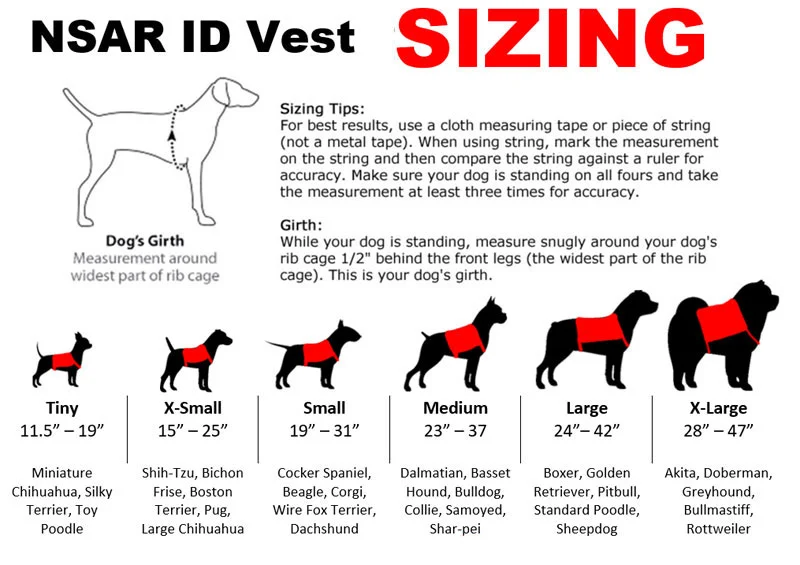
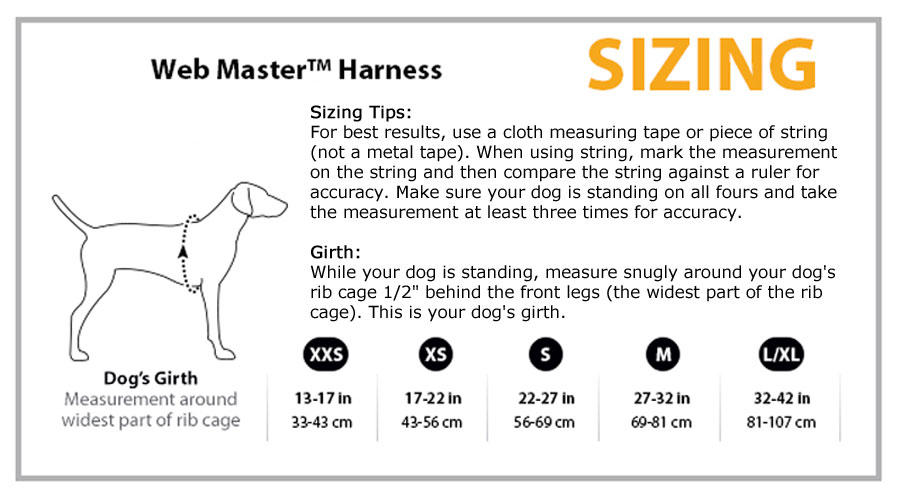
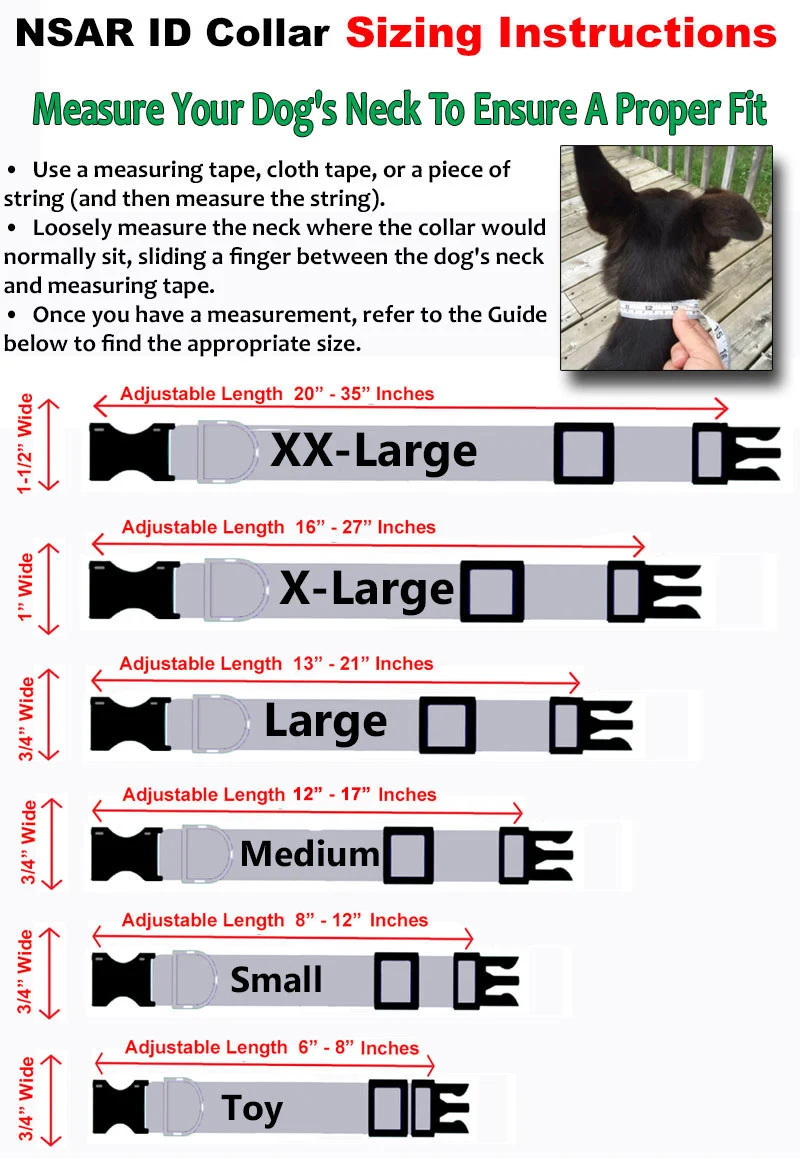
Your ID card(s), certificate, and gear arrive by mail. Check sizing on the vest and adjust straps for comfort; swap the patch to the location you prefer.

Registering Your ESA With NSAR


How to Use Your Registration in Real Life

Housing & Property Management

Lead with your ESA letter, then use your registration to simplify verification.

Email script you can copy:

Subject: Reasonable Accommodation Request – Emotional Support Animal

Hi [Name],
I’m requesting a reasonable accommodation for my Emotional Support Animal under applicable housing laws. I’ve attached my ESA letter from a licensed mental health professional. For quick reference, my ESA is registered with NSAR; I can share an ID card and certificate, and you can verify via their database if helpful.

I’m happy to answer reasonable questions and follow building guidelines.
Thanks for your help,
[Your Name]

In person: Hand over the ESA letter first. If the staff is unfamiliar, show the ID card and certificate and offer the database lookup. Keep a calm, friendly tone.

Campus Housing

Residence life teams often appreciate clear, organized documentation. Submit your ESA letter through their portal, then provide your registration certificate and ID card if they ask how to verify quickly.

Travel Logistics (Important Caveat)

U.S. airlines generally do not recognize ESAs for in-cabin access anymore. Registration does NOT create flight rights. It can, however, reduce confusion at check-in areas and hotels. If you need in-cabin air travel for a psychiatric disability, consider working with a trainer toward a Psychiatric Service Dog (PSD) and follow the airline’s PSD documentation process.


Choosing the Right Gear (Fit & Quality)

  • Vest fit: Measure girth (behind front legs), check the sizing chart, and adjust straps so it’s snug but not tight.
  • Comfort: Look for breathable materials if your animal will wear the vest frequently.
  • Visibility: Patches that read “Emotional Support Animal” are usually clearer than generic icons.
  • Durability: If you’re active outdoors, choose reinforced stitching and metal D-rings.

Tip: Keep a spare ID card in your wallet and a digital copy of your certificate on your phone for quick sharing.


Common Mistakes to Avoid

  • Skipping the ESA letter. Registration doesn’t replace your ESA letter for housing rights.
  • Blurry/low-light photos on IDs. Re-upload a clear head-and-chest shot.
  • Typos in names or addresses. Triple-check before printing.
  • Assuming public access. ESAs don’t have ADA public access like service dogs.
  • Forgetting to update info. Moved or changed numbers? Update your listing so verification is smooth.


NSAR vs “Any ESA Website”: What to Look For

Use this quick checklist to evaluate any registry (including NSAR):

  • Searchable verification (so third parties can quickly confirm)
  • Clear, professional documentation (ID card + certificate + digital copies)
  • Responsive support (email/phone/chat)
  • Quality gear (vests, patches, tags that look professional)
  • Transparent policies (processing, replacements, returns)
  • Upcharges for additional service (NSAR provides all inclusive packages, whereas others have hidden fees).

If a site promises “instant legal rights” or public access for ESAs, that’s a red flag.


Who Benefits Most from Registration?

  • Renters entering a new lease or renewing with a new management company
  • Students navigating campus housing desks and multiple staff members
  • Frequent movers who need to present documentation often
  • Anyone who wants the confidence of carrying ID + certificate + digital backups to reduce friction

FAQs

Does registration give me legal rights?
No. Your ESA letter is what supports housing accommodations. Registration helps with proof and verification.

Do I still need an ESA letter if I register?
Yes. Plan to keep your ESA letter current (often renewed annually). Renewing your letter is swift and easy through our secure online account portal system.

Can I register multiple animals?
Yes. Register each ESA separately so their IDs and listing are clear and accurate.


Does registration expire?
Database listings typically remain active; you can update details if anything changes (address, phone, pet photo).

What if I lose my ID card?
Order a replacement; keep a digital copy of your certificate on your phone so you’re never stuck.

Can registration help with airlines?
It can reduce general confusion, but it doesn’t grant flight access. For in-cabin access based on psychiatric disability, talk to a trainer about a PSD and follow airline procedures.


Putting It All Together (Your Action Plan)

  1. Get/renew your ESA letter from a licensed mental health professional.
  2. Register with NSAR—choose Basic (documents + listing) or Deluxe (add vest/patches).
  3. Assemble your “verification kit”:
    • ESA letter (PDF + print)
    • NSAR ID card + certificate
    • Digital copies on your phone
  4. Use the email script for landlords/campus housing, and keep all communications polite and documented.
  5. Update info after moves or if you change numbers; keep everything current and easy to verify.

With those steps, you’ll be equipped for smooth, respectful interactions—and far fewer awkward conversations.